1. The EOVSA Catalog
The EOVSA catalog is a relational database developed using the Interactive Data Language (IDL). The catalog entries (or metadata) consist of header information extracted from EOVSA FITS files. The content and description of these entries are given below:
ID          I*4    Catalog ID
TYPE        I*2    Observation type: 0-Image, 1-Spectrum, 2-Lightcurve
DATE_OBS    R*8    Date/time of beginning of observation (TAI secs)
DATE_END    R*8    Date/time of end of observation (TAI secs)
FREQMIN     R*4    Start frequency of observation (MHz)
FREQMAX     R*4    End frequency of observation (MHz)
XCEN        R*4    Center of field of view in solar X (arcsecs)
YCEN        R*4    Center of filed of view in solar Y (arcsecs)
SCAN_ID     C*20   Scan ID
OBJ_ID      C*20   Object ID (e.g. Sun)
POLARIZA    C*20   Antenna polarization
RESOLUTI    R*4    Resolution
NANTS       I*2    Number of Antennae
ANTENNA     C*20   Used antennae (e.g. 0 1 1 1 1 0 0 1 1)
CAL_FLAG    I*2    Calibration Flag:
                   1-calibrated
                   0-uncalibrated
PROJ_ID     I*2    Project ID:
                   0-Normal Observing
                   1-PHASECAL for phase calibration
                   2-SOLPNTCAL for total power calibration
FILENAME    C*80   Name of FITS file
FILE_DATE   R*8    Date/time when FITS file was last modified (TAI secs)
CAT_DATE    R*8    Date/time when catalog record was last modified (TAI secs)
DELETED     C*1    Deleted flag
Each entry consists of a unique ID and unique associated FITS file name (FILENAME). A FITS file can contain an image, spectrum, or lightcurve that is denoted by TYPE 0, 1, or 2, respectively. Each FITS file entry has a start (DATE_OBS) and end (DATE_END) time, center of field of view coordinates (XCEN and YCEN), start (FREQMIN) and end (FREQMAX) frequencies, and values for Polarization, Resolution, and Antennae (denoted by a series of 0's and 1's) corresponding to each observation. For book-keeping purposes, each entry contains the time when the FITS file was last modified (FILE_DATE) and the time when the catalog entry was last modified (CAT_DATE). All times are in double precision Atomic International Time (TAI) seconds.
The EOVSA catalog is maintained in the IDL SolarSoft (SSW) library in the directory $SSW/radio/eovsa/catalog. The catalog is populated and updated by the IDL program eovsa_update which reads FITS file headers from the EOVSA file system, converts them into their corresponding catalog formats, and writes the metadata to the catalog. The program also checks whether the new metadata matches metadata for previously cataloged FITS files with the same name, and updates the entry if any metadata fields have changed. The program takes UT start and end time as input parameters, as in the following example:
eovsa_update,'1-jan-14','1-mar-14'
Currently, the EOVSA catalog is mastered and maintained at the GSFC Solar Data Analysis Center (SDAC).
The catalog will be moved to NJIT after official EOVSA operations have commenced.
2. The EOVSA File System
EOVSA FITS files are maintained at http://ovsa.njit.edu/fits in subdirectories arranged by date in year-month-day format. For example:
 20140101/
 20140102/
 ......
 20140131/
 20140201/
 20140203/
 ......
The FITS files use a date- and time-based naming convention. The example below illustrates this format for an image observed at 15:41:21 on 20 August 2014:
    eovsa_img_20140820_154121.fits
    -----------------------------
      |    |    |      |      |
      |    |    |      |      |
      |    |    |      |      File extension
      |    |    |      |
      |    |    |     Observation start time (hhmmss format)
      |    |    |
      |    |   Observation date (yyyymmdd format)
      |    |
      |   Type (image, spectrum, lightcurve)
      |
     Instrument
3. Searching the EOVSA Catalog
The EOVSA catalog can be searched temporally and spatially by the function eovsa_search. The function supports the following arguments and optional keywords:
IDL> files=eovsa_search(tstart,tend,count=count,metadata=metadata)

TSTART: search start time (UT) of observation.
TEND: search end time. If not entered, then find file nearest TSTART.
XMIN, XMAX (arcsecs): find files with XCEN GE XMIN, and XCEN LE XMAX.
YMIN, YMAX (arcsecs): find files with YCEN GE YMIN, and YCEN LE YMAX.
/IMAGES,/SPECTRA,/LIGHTCURVES: find files matching image, spectrum, or lightcurve types.
CAL_FLAG: 1-calibrated, 0-uncalibrated
PROJ_ID:  0-NORMAL, 1-PHASECAL, 2-SOLPNTCAL
          or as keywords:  /NORMAL, /PHASECAL, /SOLPNTCAL
The following examples illustrate typical use cases:
;-- find all files between specified TSTART and TEND
IDL> files = eovsa_search('28-Jan-14 01:00','29-Jan-14 02:00')

;-- find file nearest specified TSTART
IDL> files = eovsa_search('28-Jan-14 18:00')

;-- find all files with x-center pointing between (-700,900) arcsecs
IDL> files = eovsa_search(xmin=-700, xmax=900)

;-- find all files with y-center pointing between (-300,400) arcsecs
IDL> files = eovsa_search(ymin=-300, ymax=400)

;-- find all files with x-center pointing greater than or equal to zero
IDL> files = eovsa_search(xmin=0)

;-- find file nearest TSTART with non-negative center pointing
IDL> files = eovsa_search('1-Jan-14',xmin=0,ymin=0)

;-- find image nearest TSTART
IDL> files = eovsa_search('1-Jan-14',/images)

;-- find all images and spectra
IDL> files = eovsa_search(/images,/spectra)

;-- find all spectra with normal observing mode
IDL> files = eovsa_search(/spectra,/normal)
The count keyword returns the number of files found, and the optional metadata keyword returns an an array of structures with fields that correspond to the catalog metadata for the returned files.
IDL> help,metadata,/st

   ID              LONG              2425
   TYPE            INT              0
   DATE_OBS        DOUBLE       1.7383736e+09
   DATE_END        DOUBLE       1.7383738e+09
   FREQMIN         FLOAT           1.00000
   FREQMAX         FLOAT           3.00000
   XCEN            FLOAT          -892.220
   YCEN            FLOAT           391.373
   SCAN_ID         STRING    ''
   OBJ_ID          STRING    ''
   POLARIZA        STRING    ''
   RESOLUTI        FLOAT           0.00000
   NANTS           INT              0
   ANTENNA         STRING    ''
   CAL_FLAG        INT             -1
   PROJ_ID         INT             -1
   FILENAME        STRING    'eovsa_image_1.00_3.00_20130201_0132.fits'
   FILE_DATE       DOUBLE       1.7776544e+09
   CAT_DATE        DOUBLE       1.8003785e+09
   DELETED         STRING    'n'
4. Graphical User Interface (GUI) to EOVSA Catalog
The EOVSA catalog can also be searched graphically using the IDL interface show_synop, which
allows joint searching with selected ground- and space-based observations in the
Virtual Solar Observatory (VSO).
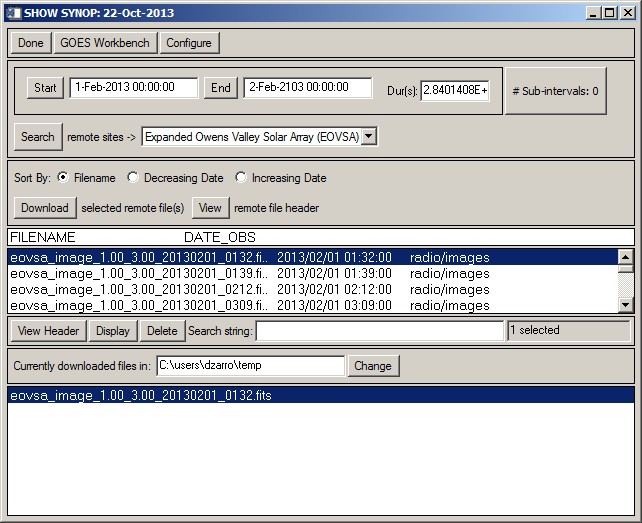
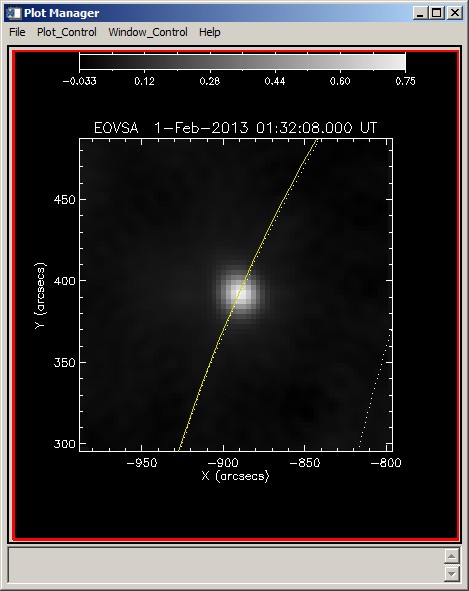
In the above example, EOVSA images (simulated) are listed for the time period 1-Feb-2013 to 2-February-2013. A selected image is downloaded from the EOVSA archive to a local directory and displayed using the plotman GUI.